
Functionality updates
EnRoute hub:
This release introduces the EnRoute Hub, a centralized panel for managing toolpaths and design objects within EnRoute. It consolidates key workflow information into a single interface, improving visibility and access across your project.
The Hub can be toggled on or off via the View menu.
EnRoute hub activation within the View-menu
Toolpath Page
The Toolpath page provides a focused overview and quick-edit interface for toolpath-related data.
Users can select a toolpath type, choose an existing strategy, or create a toolpath from scratch.
Toolpaths page Type selection Type Strategy selection
When a toolpathed object is selected, its core parameters are displayed within the panel. Users can quickly adjust key settings such as depths and other toolpath-specific parameters and also have quick access to the cut parameters for each tool.
Parameters of selected tool path shown in the tool paths page
Objects page
The Objects page provides a structured view of all design elements within the file. It displays all file objects, including layers, sheets, toolpaths, and groups
It reflects current selections made in the drawing area and can also be used to create new selection
Selection reflected in the objects page
It includes a contextual menu for creating, editing, and deleting toolpaths directly from the list view
Contextual menu in the objects page
The system layer displays groups when present in the file. When using the Automatic tool pathing module grouped items will inherit the part name as the group label.
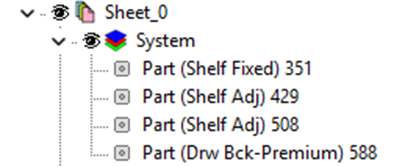
System layer of the Objects page
System layer of the Objects page
Items can be dragged and dropped between layers and sheets for quick organization
Cloud page
The Cloud page has been given a tab within the EnRoute Hub.
Cloud page within the Hub
Manual Ordering Enhancements:
Manual ordering has been extended to support more granular control per layer.
Manual ordering has been extended to support more granular control per layer.
- Users can now define a separate manual order for each layer, rather than relying on a single global ordering system.
- To fully control the output sequence, ordering priority must be set as following:
- Prioritize layers
- Then Objects
Eg.
prioritization example for Manual ordering per layer
Fixed bugs
- Fixed automatic drill offsets incorrectly assuming a specific drill bank layout
- Fixed 3D Engrave to Relief not applying correctly to the relief
- Fixed a black screen appearing after opening Quad View post-relief creation
- Fixed Entry/Exit and bridge elements not appearing in perspective and side views
- Fixed guideline redrawing issues
- Fixed measurement tool text appearing too small
- Fixed Surface and Chamfer tools not highlighting selected contours
- Fixed Modify Relief not updating area of effect and preview
- Fixed polygon mesh creation not displaying correctly